Are accessibility settings in games for everybody?

Accessibility can improve games for people without disabilities

Games are becoming more accessible with many games providing you with visual, audio, and cognitive assistance upfront. Even though not every developer has caught up to providing the best accessibility to their games, they are more common than just a few years ago. Even though I am visually impaired, I don’t always need all the settings turned on and if I do need more assistance, I can just toggle them on or off as needed.

Accessibility settings aren’t just there to help those with various disabilities but can help anybody just have more fun with the game that they are playing. Some gamers love testing their abilities by turning up the difficulty, removing all of the icons, and exploring the world with only their wit and refined skills. However, there are those gamers who just want to jump into a game and progress through the missions and stories with friends or by themselves.

While some gamers will pride themselves in enjoying the game in its purest form, you should know that it’s completely fine to turn on some of those accessibility settings. Some accessibility settings are especially useful for everybody and not just when you’ve got a disability. Here are some of them:

10 Accessibility options everybody should try

Racing lines & Braking zones

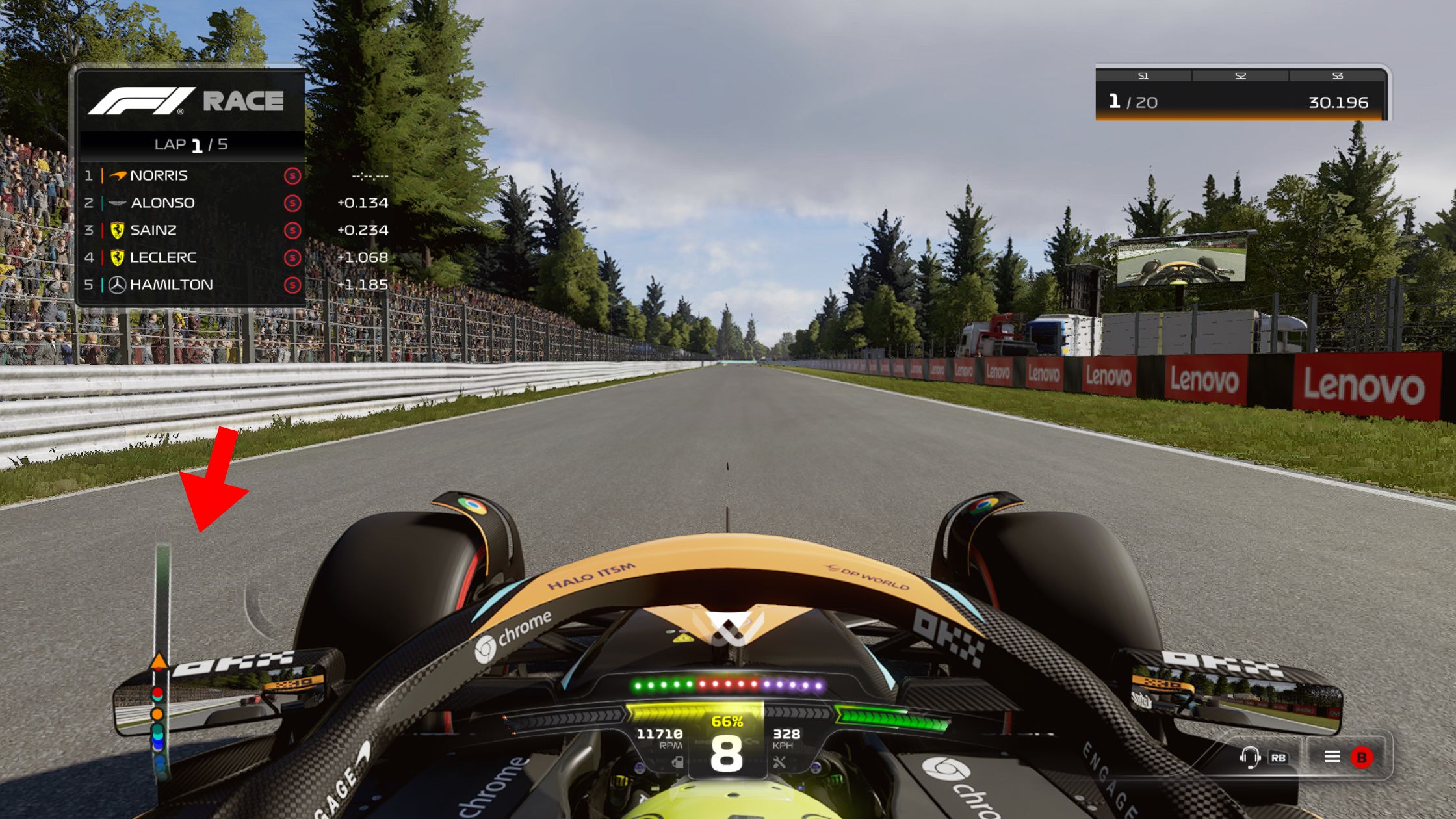
There are tons of racing games out there and while some double-down on fun and arcade-style racing, others aim for realism, like sim racing. Simulation racing games want you to focus on realism and while most people can play and compete like real racing drivers, not everybody can focus on everything around them while driving. If you’re like me and have never driven a car, it can be a lot harder to play sim racers without those helpful braking zones.

Many games give you an option for entire racing lines while also providing an option that only gives you the corner markers and braking zones. Some games like F123 even give you an option for 2D road markers or as many as large bright 3D zones to help you brake and turn correctly. If you’ve played some off-road races in Forza Horizon 5, you’ve got events where it’s hard to see your next checkpoint, so having the full racing line might be necessary.
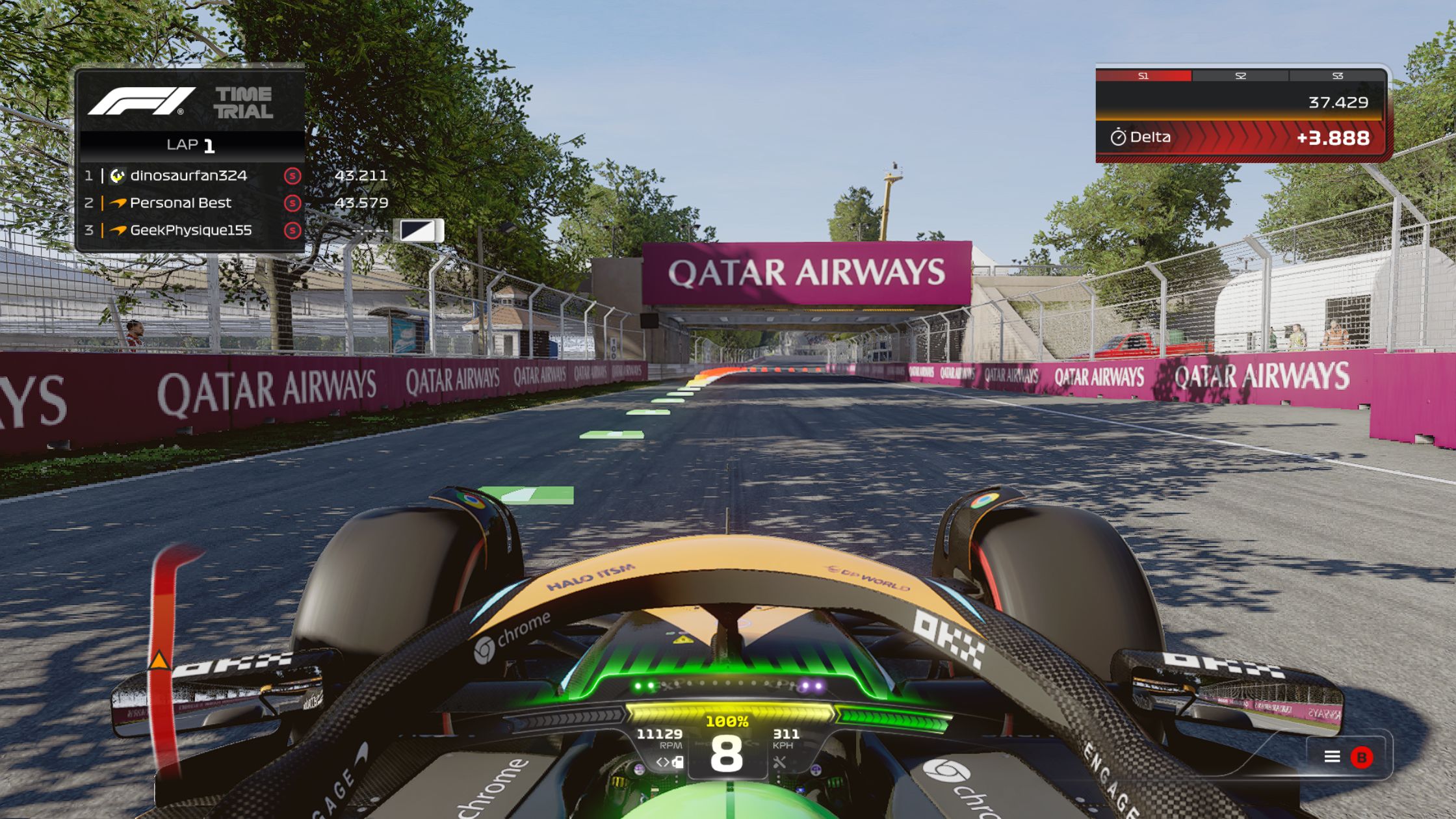
F1 23 Canada Racing line and braking zone
Racing lines and Braking zones play a big role in the enjoyment of games.

Did you know that this setting doesn’t show up for those you’re racing with? Some people might feel that you’re making the game too easy, but they don’t even affect them. Whether you use the full racing line, give yourself some corner and braking references, or no help at all, the goal should always be your level of enjoyment. 

UI icons & Waypoints

Most games are built to be as realistic as possible but they’re still games, so the UI (user interface) is still a big part of the experience. If you want to add some icons, status bars, and waypoints on your screen or map to help with exploration, you should never feel bad for using them. Some games can clutter the screen quite a bit, so having options to reduce it is a necessary feature, even for people who can get overwhelmed by the clutter.

Less screen clutter improves the cinematic feeling of the game while others just want to play and get through the story as easily as possible.

Whether you want less or more icons on your screen or not, the option should always be available to improve your personal experience.

You can also read my article about mini-maps and icons.

Screen brightness

Most games get you started with a screen brightness setting, especially when you’re playing something spooky. However, if you’re going to feel a bit more comfortable with seeing more of the environment by turning the brightness up, do it as much as you need to. It can also help you find loot or deal with puzzles, even if you have perfect vision.

Brightness settings can also be changed when you’re struggling to see on the screen at night or during the day in a bright room.

Diablo 4 Screen brightness comparison
Screen brightness settings can help you see what’s happening on screen for different environments.

Loot highlighters

We’ve mentioned the clutter of icons in the UI and the screen brightness but some games make it possible to find loot without bright icons that ruin the look of the world. Some games use audio cues telling you about nearby loot while others give subtle colour changes or smoke effects that suit the world. For some, these subtle loot highlight options can keep you engrossed in the world without putting bright icons in your way, especially if they suit the world’s aesthetic and art style.

Some games will just put an icon on your loot while others will add a quick shine of an item or plant to draw your attention.

Diablo 4 with plant highlight
Subtle loot highlights can improve exploration even when you’re not visually impaired.

A game can also add some extra shadows or consistent subtle colour differences that keep to the art style, but make it possible to notice something. E.g. Diablo 4 will add a slight smoke effect to draw your attention to a collectable plant or rock without being distracting.

Subtitles & Narration

Games can have expansive stories with a ton of lore to flesh everything out. Subtitles are a great option to help us stay on top of the story and not get distracted by phones and our intrusive thoughts. You don’t have to use subtitles if you have a hearing impairment and being able to change the size of the subtitles and screen text can help everybody. Some games have big scenes but very small icons and text, making text size options important, especially if you’re sitting far away from a screen.

What are some other reasons for adding subtitles to your gaming sessions?

  • If you’re already a bookworm, just reading the subtitles while listening to the voice acting can help you remember details and keep your love of reading alive too.
  • Sound mixing has been getting a lot of negative press as movies and games have loud action scenes with very soft speech, so turning on the subtitles can help you follow the story.
  • Streamers often speak while playing, making it hard to hear the game, so having subtitles can help the hearing impaired and just improve overall experience while being entertained.
  • Gamers can also add a dark background to white text for improved contrast and readability.
  • You can change the colour of text to improve readabiity.
  • Some people even have auditory processing issues, especially if they have disorders that can cause sensory overload, like autism.

If subtitles aren’t working, what about menu narration options to help you listen to the options highlighted by the cursor? Sometimes, a bit of audio help goes a long way with finding loot too. Let the game describe what’s happening on the screen and guide you through the world as you explore.

Some games like the Hellblade games have narration and audio cues as a gameplay mechanic.

Motion blur & Screen shake

Whether you’re driving or running fast in games, they like adding motion blur to make it feel even quicker. You also get screen shake settings that help you experience hits during crashes and fights. However, these settings can be quite frustrating because it isn’t really how we experience the world.

Motion blur can’t just make some people feel motion sickness when running along, but you can miss important points of interest, like loot or world details.

Racing motion blur
Motion blur is notorious for causing motion sickness. Photo via Connor Henlin

Screen shakes can also cause motion sickness for many people and can just be frustrating to look at, especially in beautiful worlds we want to feel engaged with.

Most modern games have options to turn off motion blur and screen shake, so turn them off if they affect your experience.

Strobe light filters

If you have an epilepsy condition, you know exactly how strobe lights (flickering lights) can cause major issues. However, these flickering lights can also cause discomfort for almost anybody, especially when you play games for a long time. Strobe lights can also cause motion sickness for some people.

Turning off strobe settings can reduce eye strain while also helping you see better in-game.

Tinnitus filters

Tinnitus is the perception of sound that does not have an external source, so other people cannot hear it. Tinnitus is commonly described as a ringing sound, but also roaring or buzzing.

If you’ve been listening to loud music or games your whole life, chances are that you could develop some form of tinnitus. People can also develop vestibular conditions which affect their balance.
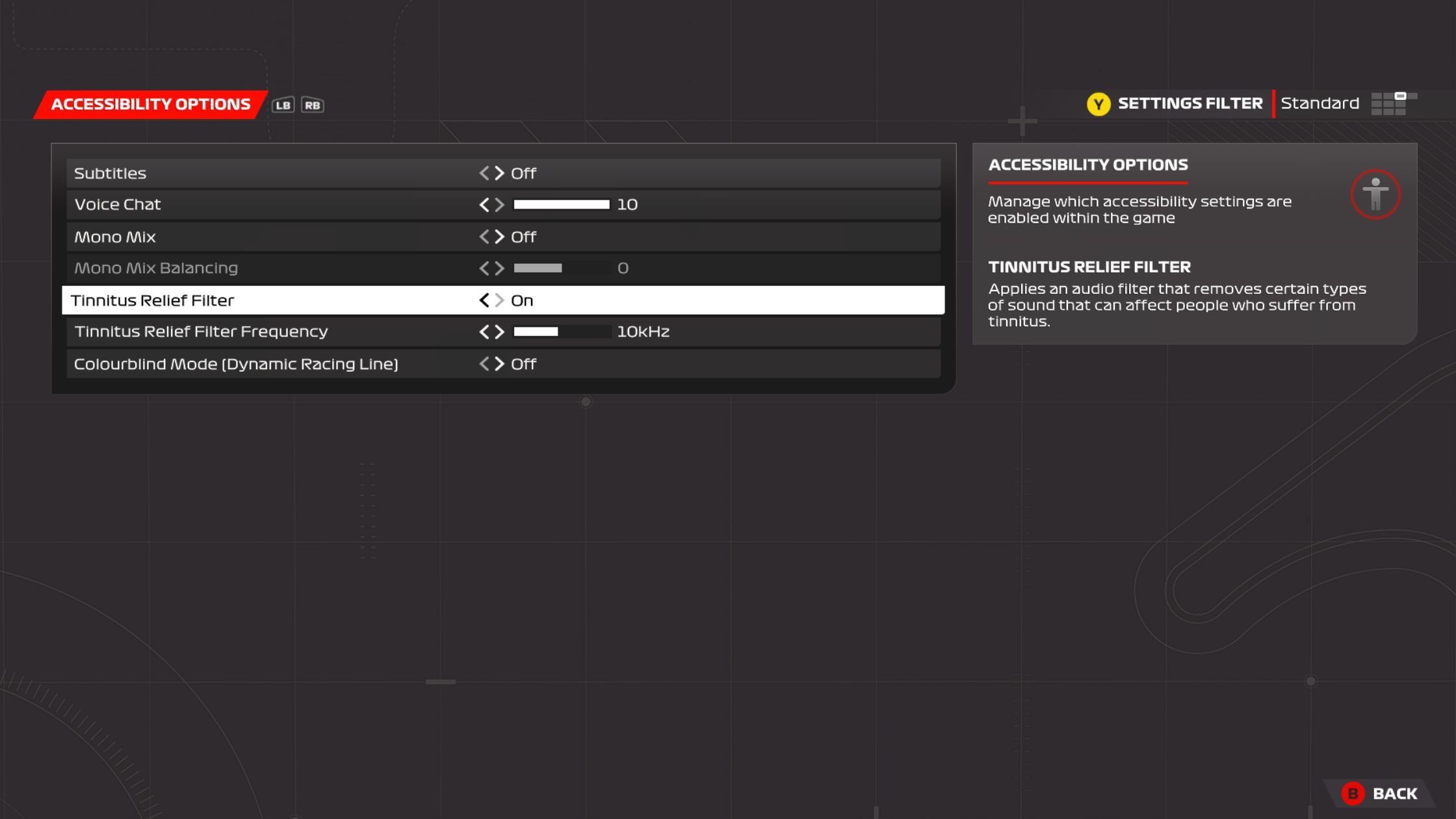
F123 Accessibility options highlighting the tinnitus filter
Adjusting tinnitus filters can help with various sensory issues.

Some games can have repetitive or sustained noise that can cause discomfort, even if you don’t have tinnitus. If you’ve ever played a Formula 1 game, you know that the high-pitched car noises can start feeling uncomfortable. As one of the few games with a tinnitus filter, the F1 series makes it easier to enjoy a game with your headphones on. 

Keep your sensitive ears in a healthy condition by playing around with tinnitus settings where available.

Controller vibration

Controllers have been vibrating since controllers like the Dual Shock for PlayStation. As the generations progressed, so has the technology, making vibrating controllers integral to gameplay. Controller vibration and haptics can help you feel more engaged with the environment.

If you’re playing a racing game, the controller will vibrate differently when braking or when the tires are spinning. It will also change when you drive over curbs or hit another vehicle. Action games won’t just vibrate when you get hits, but they can buzz when you pick something up while other games will vibrate with your character’s heartbeat. If sight is an issue, different vibrations will let you know something specific about your actions.

Modern game controllers have various types of vibration to improve tactile gameplay.

All of the different vibration effects added by developers are there to help you experience the game in a much more tactile way. Using more senses at once can help you feel more engrossed in the world.

Colourblindness filters

If just changing screen brightness isn’t enough to help you enjoy a game, what about using the colourblind filters? There are various forms of colour blindness but they all involve an inability to process and filter certain colours.

Quadrants of colourblindness filters in Diablo 4
Colourblind filters alter which colours are filtered for a different contrast when playing.

If you turn on these filters, it will drastically increase contrasts in colours, making it possible to experience the game more comfortably.

Games don’t just have accessibility settings to help people with disabilities to enjoy games. These settings can help people with a range of conditions feel more comfortable while spending hours playing them. They also make it possible to have a lot more fun by just giving you some extra guidance while not sullying the experience, whether you have specific needs or not. Accessibility settings and assists make it possible to have as much fun as possible with a wider range of fantastic games.  
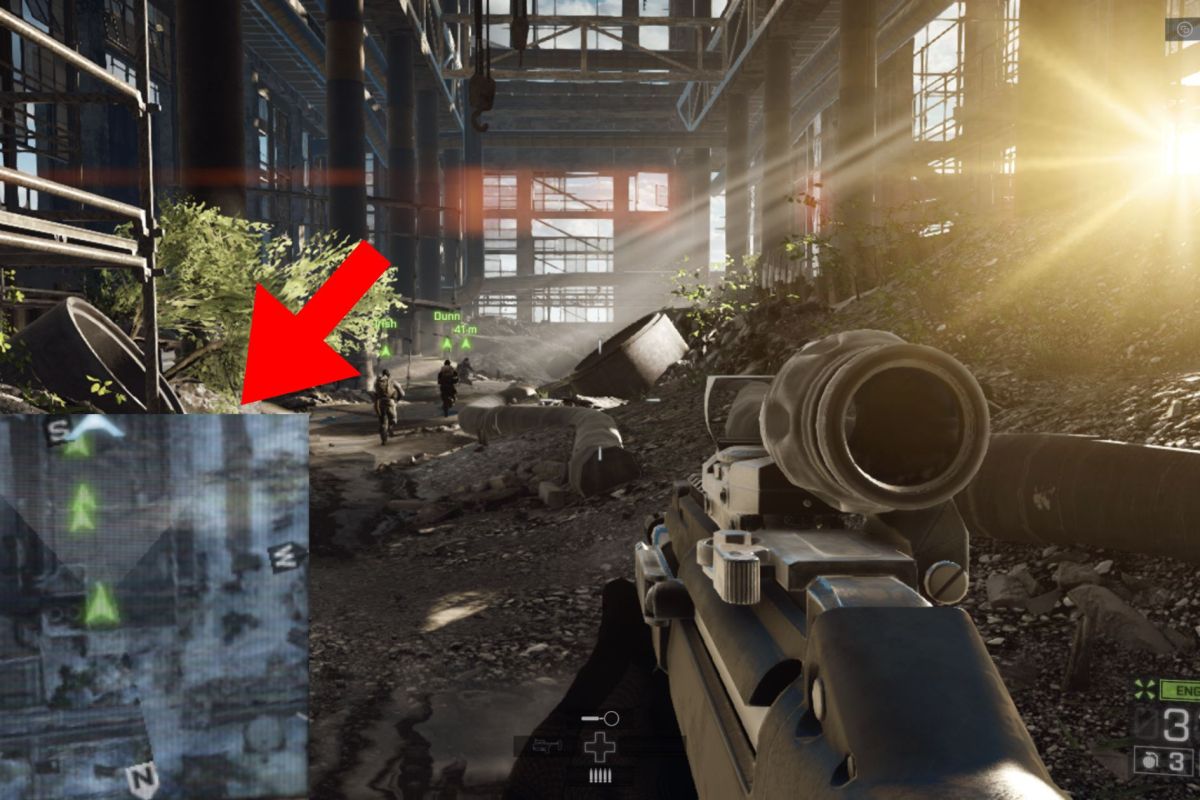
The mini map is important to those with visual impairments

Battlefield 4 with enlarged mini-map to help people with disabilities.

I’ve been playing video games since the 90s, but after a long hiatus and only getting back into it a short while ago, I’ve jumped back into older games while also enjoying new ones. One of those goals was to try out some popular game franchises I see spoken about daily but never got a chance to play myself. While I finished some and jumped to others, one aspect came up quite often when it came to immersion and fun: the mini-map. 

It’s not just the actual inclusion of those small maps on your game’s UI that makes a difference but also the colors, details, and of course, the location used. In many modern games, you can turn off all of the icons and images on the UI to enhance the immersive experience. There are even settings where you can change the colour schemes to help those with colour blindness, but there are often none to move the icons, like the mini-map, to make it easier for those with specific visual impairments.

Red Dead Redemption 2 immersion
The mini-map and UI plays a big role when it comes to game immersion.

In my situation, my visual impairment leaves me with mostly peripheral vision in my left eye, making it difficult to see certain things on the right side of a screen. I specifically noticed mini-map locations when I dove into The Witcher 3: Wild Hunt where the mini-map is in the top-right corner, making it very hard to follow certain paths. I went back to games that I’ve played, many of them action, action-RPG, or racing categories where I noticed that most of the maps in my experience had the mini-map in the bottom-left corner. There are genre-specific variations of these maps but more often than not, it’s an abstracted view from the bird’s eye perspective.

There are always exceptions to the rule, but what makes a difference about these maps, especially when you’re visually impaired?

Map Location

For many gamers, the location of the mini-map isn’t noticed because it’s either not used, you’re used to the franchise’s UI, or you turn it off and only want the beautiful visuals on screen to explore without any assistance. However, for many like myself with a visual impairment, finding our way is a bit trickier and the location of the map starts making a difference.

For games like first-person shooters, racing games, action-RPGs, and even strategy games, the mini-map is usually on the left side, especially at the bottom. MMORPGs almost always place theirs in the top-right corner.

Usually, this placement is due to the perspective as it often means this is “behind” the character or in an area of the map where we rarely need to focus on any sort of gameplay. This means that the bottom left corner is perfect because it’s not going to interfere with the action going on in front of you, and you have to draw your attention away just slightly. In Western cultures, we usually read from left to right, which also affects where we look first and then follow to the right. However, just looking to the top-right corner to “check” the map, draws your attention there first which can prolong your reaction times.

All of the detail, or none of it?

The mini-map is usually a smaller version of a larger map that the game already has but we don’t always want to see all of the same details. RTS (real-time strategy) games often have quite a large area section shown as one controls a larger area of the game with units, terrain, and buildings being seen from above. Shooters and racing games will provide you with a much closer view, only showing you your direct vicinity to find out where your character is and maybe which direction you’re going or need to go.

F1 23 McLaren racing at Spa, highlighting the transparent mini-map
How much or how little do you want to see the mini-map when it’s there?

How much detail a mini-map has can make a big difference for those with visual impairments. Certain colour combinations will be better for those with colour blindness and just having too much colorful detail can end up distracting from the real action being displayed on the screen. Mini-maps often have a basic colour scheme to ensure that when there is a contrasting colour for a point of interest or highlighted path, it’s noticed easily. We also want those compass directions on there too, or at least an icon for North, to help with navigation.

To streamline the UI, many games declutter the map by using the often circular mini-map with status bars and other finer details you want to keep note of. However, it can again become quite distracting if done wrong. Too many bars or details will widen the small map and it can bleed into the action happening on the screen. I’ve experienced some mini-maps that use either side of the map for their bar, helping with the diameter.

Full-sized maps usually have recognizable icons for buildings, vehicles, and other points of interest that reflect what they would look like in the real world. They often have the names of these locations too, but should the same happen on the mini-map? These metaphor images are usually enough for the maps without too much extra text making it harder to see the important details.

Immersion with a visual impairment

One might think that adding more information in the UI like a mini-map, status bars and more icons would help somebody with a visual impairment, but it could completely distract from the gameplay. Games can be like big movie set-pieces, so we want that cinematic feeling when we dive into their worlds.

With some visual impairments, it’s not possible to see a lot of detail, so having less on the screen, maybe to a point of no UI at all, might help the gamer find their way and play the game more effectively. When there’s less to look at, the focus can be on the natural environmental clues instead of looking away at colourful maps and numbers across the screen. One of my favourite examples being Dead Space which uses the character’s suit to show Isaac’s health instead of a UI status bar.

“Depending on the game, no mini-map – or even no UI entirely – can really give the game a cinematic feel” – Kervyn Cloete

Being able to partially or completely reduce UI elements may help gamers with visual impairments feel more immersed in the world. For some, audio clues could help but even those can/should be optional.

Do we still want the mini map?

A mini-map is supposed to work as a quick reference for finding yourself or teammates while things are happening or just finding your way to a location you’ve set a waypoint for. These details help to give you a smooth experience to help immerse yourself in the meticulously-created worlds of these incredible games. It can help those with some impairments explore more effectively while still being immersed in the world.

You might not always notice how you experience the inclusion of a mini-map, but when it suddenly changes, it can have a larger impact on those you rarely think about. Whether it be the location, icons, or other details added to the map, details matter, even if it’s less detail than necessary.

How sport helped me overcome impossible hurdles

How sport helped me overcome impossible hurdles

There are countless movies about sporting heroes, fictional and real life, that overcome adversity. Books have been written about legends of their respective games that came from nothing to make something of themselves. This is NOT one of those stories, but one of somebody just finding their way, and it all started with some sport at school and how exercise helped overcome some hurdles to be just a little bit more independent.

Having been born with a visual impairment that left me legally blind and a doctor telling my parents that I would never read or write left quite a bumpy road ahead. With a mother who overcame the hurdles on her side and pushed me to do more than feel sorry for myself, and a school specially made for visually impaired people, there was a start but it was slow. I was never the tallest and a little bit chubby, while in boarding school for most of the week and there weren’t that many options for physical activity in a school for kids with visual impairments. These factors made it hard for somebody who ate like they hadn’t eaten all day (even though I did) to stay healthy and deal with fat-shaming because nobody could be shamed for their disabilities. After all, everybody was disabled.

I was always a fan of sports, especially cricket and rugby, but my school did not have them, not even blind cricket. The school did have a grass running track like most schools would but it also had a 25m Olympic-style laned swimming pool. We had the usual annual inter-school athletics meets but I never knew you could do more so it was only when I was about fifteen that I just started joining my fitter friends on the running track when it wasn’t even athletics season anymore.

I enjoyed having something to do in the afternoon, having mini competitions with my friends on the track and the bug got me. Not only did I develop a competitiveness to do better than they or I did, but I saw my body change and become stronger. Now, we know the way you look is the least important thing in life but when you’ve got low self-confidence, seeing those little changes makes you feel better.

Now, we can go on about how I somehow got into Stellenbosch University and eventually got my degree in Sport Science where I learned bout everything the body does to be better. I made friends who taught me how to lift weights and lessons that taught me more about the different sports I loved but knew little about. However, we want to know how sport and exercise helped me reach for more rather than sit around and say that I can’t do that one thing or exclude myself from living a more independent life.

Self-confidence

At the most basic level, sports can boost your self-confidence to heights you can barely imagine. It can be as basic as seeing changes in your body and feeling better about how you look in a mirror. But, with myself, I was seeing changes in my performance. Realizing that putting in hard work that was also fun provided me with confidence when I saw the running times go down and the weight I lifted increase. Not every person needs to be a world-class athlete but whether it’s in the gym or just going for a run and going a bit faster, those small wins made me feel more confident and made me work harder to get better next time.

Personally, looking good made me feel confident, but that was in the beginning.  The confidence I got through exercise made me more comfortable to step outside of the disability box I put myself in and try new things in the outside world like going to university on my own, building friendships out of nowhere, trying different types of sports and even karting, which somebody with my eyesight probably wouldn’t usually attempt.

Discipline

My friends motivating me to start running with them was how it all began but exercise is a great, if not the best, way to build discipline. When you start seeing the small changes in your body and performance, you want to do a little bit better each time. Through the constant work on myself, I learned about what discipline was and how when I kept showing up to the gym or work, I would achieve my goals more consistently.

Showing up and putting the work in every day whether I wanted to or not became a habit so, it doesn’t feel like work anymore and I can just keep moving forward and build on what I did the day or week before. You don’t have to wake up at 4 am every morning to go to the gym or sit at your desk, but having some form of routine will help you build discipline.

I used my confidence and discipline to set new goals like going out further into the world, including running long distances on the road without any assistance. I used it to build a career in industries myself and my parents were told would never be possible.

Goal-setting

For most of us, work is not what we want to do during the day, but if we turn it into a bit of competition with ourselves, we can get through it more easily.

Setting goals in the gym while following a program taught me how to set goals for the workday as well. We can all write our day’s jobs into our diaries but what about setting goals similar to our workouts? Being able to do a specific job in less time isn’t a top priority but setting the goal of having fewer errors for a piece of work will automatically make it more efficient. It can even be as simple as finishing longer tasks before shorter ones later in the day when your focus tends to dwindle.

Set goals at work like you would in the day’s workout or training session, and you might see changes coming.

Making unlikely friends

Whether watching a game with friends, being part of a team, or running a race, I’ve met all kinds of people.  I met people to nerd out with when it came to our favorite sport and got to train, and compete, with all kinds of amateur and professional athletes. I even got to write about training for a World’s Strongest Man finalist and Britain’s Strongest Man when the world was falling apart in 2020/21.

Sport has taught me that disabilities don’t matter because as long as you’re doing something to do better, you’ll always have people around who support you, and provide unlikely opportunities.

Along with a strong family behind me who never let me do less than I was capable of and getting my sweat on a couple of times a week, I learned lessons to carry with me for my entire life to come. It helped me become more confident and disciplined, helped me make friends, and gave me a career that some would have thought impossible from the day I was born.

Accessibility in gaming means accessibility in life

person wearing glasses and bright headphones playing a computer game

A lot is going on in the world of gaming and accessibility is one of them. We always want more people to play games and for a long time, people with disabilities or special needs were completely unable to enjoy any of these interactive works of art. However, we’re still not where we want to be with accessibility to play many of them but why does it need to change, other than just sitting in front of that screen?

As a visually impaired person, games have played a bigger part in my life since the 90s than people often realise. Being able to play games has provided me with skills to overcome some of the hurdles I was told would stop me from being independent. These games provided me with the opportunity to experience freedom most people might even take for granted.  

Hand-eye coordination

We constantly need to interact with the world around us but not everything is static. We need our gross and fine motor skills to work well with our visual acuity and eye movement control (oculomotility). Being able to react to fast-moving objects on a small scale has taught me to be more vigilant about the world around me.

If it weren’t for games teaching me coordination, I would not be able to run the many road races including marathons on my own because I would not have been able to notice moving cars and static objects in front of me. I would barely be able to do my job as a personal trainer, seeing how people move and being able to correct my client’s technique. With all of these things, I’m able to notice and react appropriately more than I technically should be able to, according to those I knew at a young age. I could even go-karting with friends because I love racing games, and they gave me a good understanding of the mechanics without being able to see as well as everybody else.

Puzzle solving

Problem solving is a big part of most games. You are forced to notice patterns and find solutions to puzzles that prevent you from moving forward in a game. From a young age, being able to solve various visual, audio, verbal and language puzzles are a big part of growing up.

Games give anybody a chance to apply their intuition to new environments. These puzzles aren’t just for those with disabilities but anybody who loves games can enjoy solving these puzzles and feel more accomplished. They help us train our brains which of course is only a positive skills in the real world.

Stress-relief

The world can be a tough place to live in. Between a cost-of-living crisis, having a career that barely pays for anything, and a world that feels like it’s falling apart, we need some catharsis.

Being disabled makes it even tougher as well-paying jobs are less accessible, it’s harder to make friends because we’re not out in the world, and doing basic things every day that others do naturally can be very frustrating. By being able to jump into new worlds with incredible visuals, stories, and characters, we can find a place to control our outcomes. If we’re able to have access to more games with controls and settings that help with some of the basics, we can get lost in those worlds for a while and forget about what’s stressing us out.

Having maps in the same place each time, larger text, colour blindness settings, audio cues and even braking zones in some games make a big difference to how much fun we can have. These accessibility settings also don’t affect those you play with and against.   

Making friends

For many people with disabilities, going outside and meeting people has more challenges than you might think. Whether it is cost, general disability access, or just confidence to put yourself out there, meeting people is much harder. There are many basic activities that are just not accessible for many with disabilities and they can be as simple as hiking. With games being more accessible and those games having online multiplayer modes, you can meet people from all over the world who you can team up with or play against.

Personally, just getting around is tougher because I don’t drive but for others, it can be even harder because e-haling might not be accessible or buildings and companies don’t make it possible for people with disabilities to even participate in activities.

Games make it possible to just jump into games with friends any time of day without worrying about cost or time. Nobody cares about how you look or where you’re sitting; as long as you are a friendly presence and enjoy your time with a group of buddies.

These games we love really are more than digital landscapes; they are worlds where we can escape to, live in and interact with people we would never get a chance to. They are an escape from daily frustrations, provide us with puzzles to decipher and give us skills that help us become more interactive, and independent, in the real world.